AI Workspace & Agent PlatformPrivate beta

Your AI does not need another chat window. It needs a workspace.

Reforception puts the work above the model. Plan, chat, notes, agents, repositories, tools, and connected machines stay in one operating environment while you choose the intelligence and the authority for each job.

You choose the intelligence. Reforception coordinates the work. You stay in control.

Reforming Perception

Reforception workspace

One request · coordinated execution

Owner controlled

Request

“Review the auth change, repair anything serious, run the checks, and show me what changed.”

Plan

Shape the work

Ready

Break the outcome into review, repair, checks, and approval.

Intelligence

Selected model

Provider and model stay explicit.

Tools

GitHub + workspace

Only connected resources are available.

Agent execution

Bounded work in progress

Working
Read repoEdit workspaceRun tests

Result

Evidence before approval

Your decision

Changes, checks, failures, and remaining decisions return to the same workspace.

Illustrative system view. Reforception keeps model choice, connected resources, execution, and approval in one visible workflow.

From request to result

One request. A whole system behind it.

The point is not to collect AI models in one screen. The point is to move real work through the right intelligence, tools, permissions, and execution environment without losing the thread.

  1. 01

    Describe the outcome

    Start with the result you want, not a tool-by-tool workflow you have to wire together yourself.

  2. 02

    Shape the work

    Turn the request into a plan you can read, adjust, and approve before execution begins.

  3. 03

    Choose the intelligence

    Use the connected provider, model, or agent that fits the job. Reforception does not silently swap your choice.

  4. 04

    Run against real resources

    Let bounded agents work with the repositories, services, and machines you explicitly connected.

  5. 05

    Review the result

    See what happened, what passed, what failed, and what still needs your decision before work moves forward.

Why Reforception

The work is the permanent layer.

Models will change. Providers will change. The workspace around your goals, decisions, permissions, and results should not have to.

  1. 01

    The workspace outlasts the model

    Plans, notes, and the shape of the work stay put when you change models. The model is the intelligence for a task, not the place the work lives.

  2. 02

    You pick the provider

    Choose the provider and the model for the job. If that choice cannot run, the work stops and says so. It does not quietly continue on a different provider.

  3. 03

    Execution has an address

    Local work and remote work are different places. Reforception is built so you can tell where a task is running, and what it is allowed to touch.

One product

Different surfaces for different kinds of work.

Chat, Plan, Build, Notes, Connections, and Host Agent are not separate products. They are different ways into the same workspace, with the same work and boundaries behind them.

  • Reforception Chat

    Ask, compare, and revise in a thread that stays attached to the project instead of disappearing into a disposable chat tab.

  • Reforception Plan

    Turn a loose request into a sequence you can check. Planning stays inside the workspace. It is not a separate product.

  • Reforception Build

    When a task is clear enough to run, pass it to an agent and watch the progress. You see status and a result, not a silent black box.

  • Reforception Notes

    Keep drafts, decisions, and reference material in the same workspace as the conversation, instead of in a second app you forget to update.

  • Reforception Connections

    Bring in outside services on purpose. A connection is something you add. It is not assumed, and it is not hidden.

  • Reforception Host Agent

    Some jobs belong on a machine you control. A Host Agent is the boundary for that local or remote execution.

The product in action

One workspace. Different views of the same work.

These are real Reforception product surfaces rendered from the application components with safe fixture data. The point is not six separate tools. It is one system that keeps the plan, execution, evidence, and people in the same place.

Plan

Turn an outcome into work you can actually see.

Reforception Plan turns a project into visible work: what is active, what is blocked, what is ready, and what still needs a decision. The AI planning assistant can propose changes without silently rewriting the plan behind you.

  • Projects, milestones, status, dependencies, and next actions in one view.
  • Planning assistance stays reviewable before changes are saved.
  • The plan can feed bounded work to agents instead of becoming dead documentation.
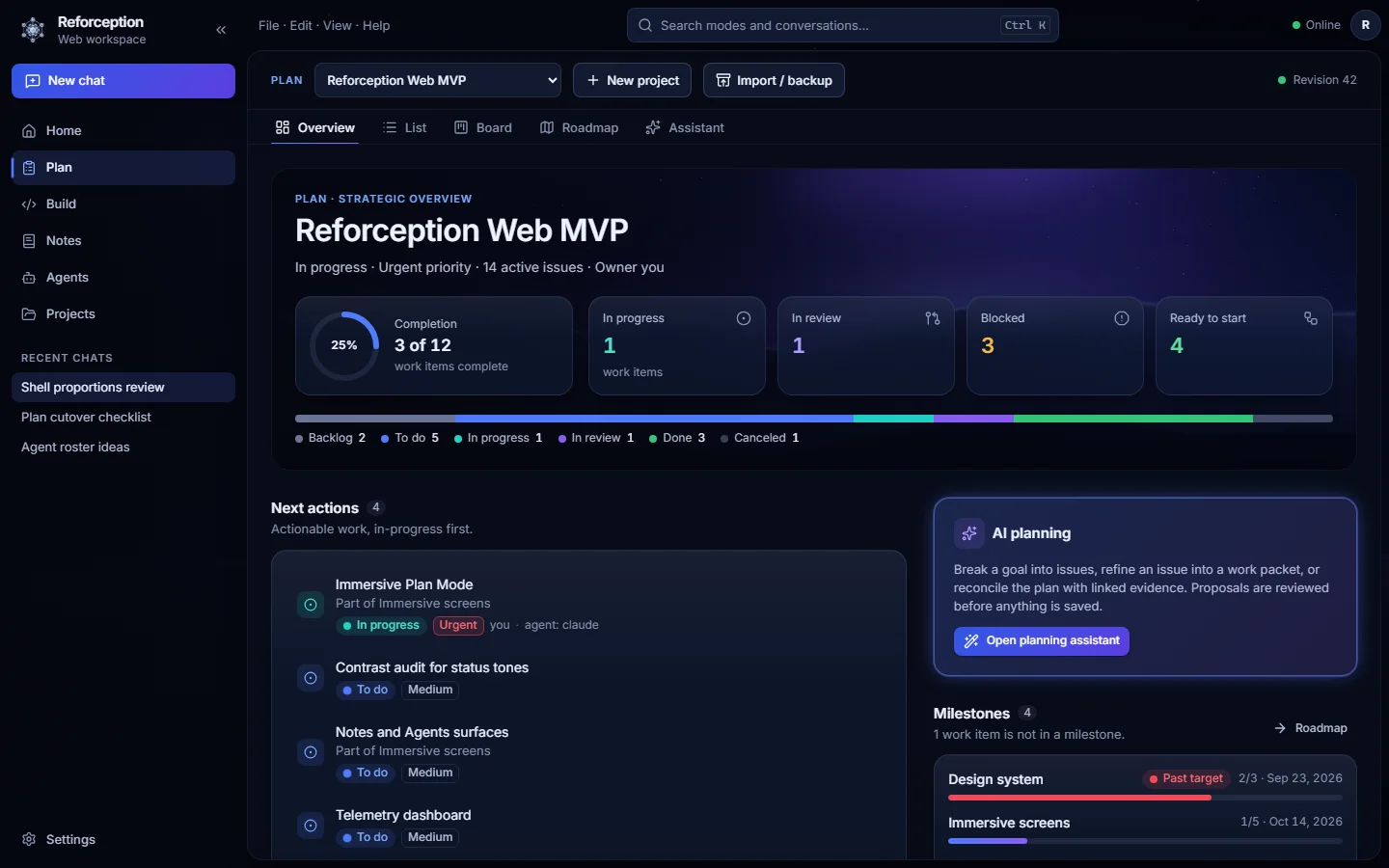
Reforception Plan showing a project overview, work status, next actions, milestones, and AI planning assistant.
Actual Reforception UI · rendered with fixture data.

Build

Give an agent a bounded job and watch the work happen.

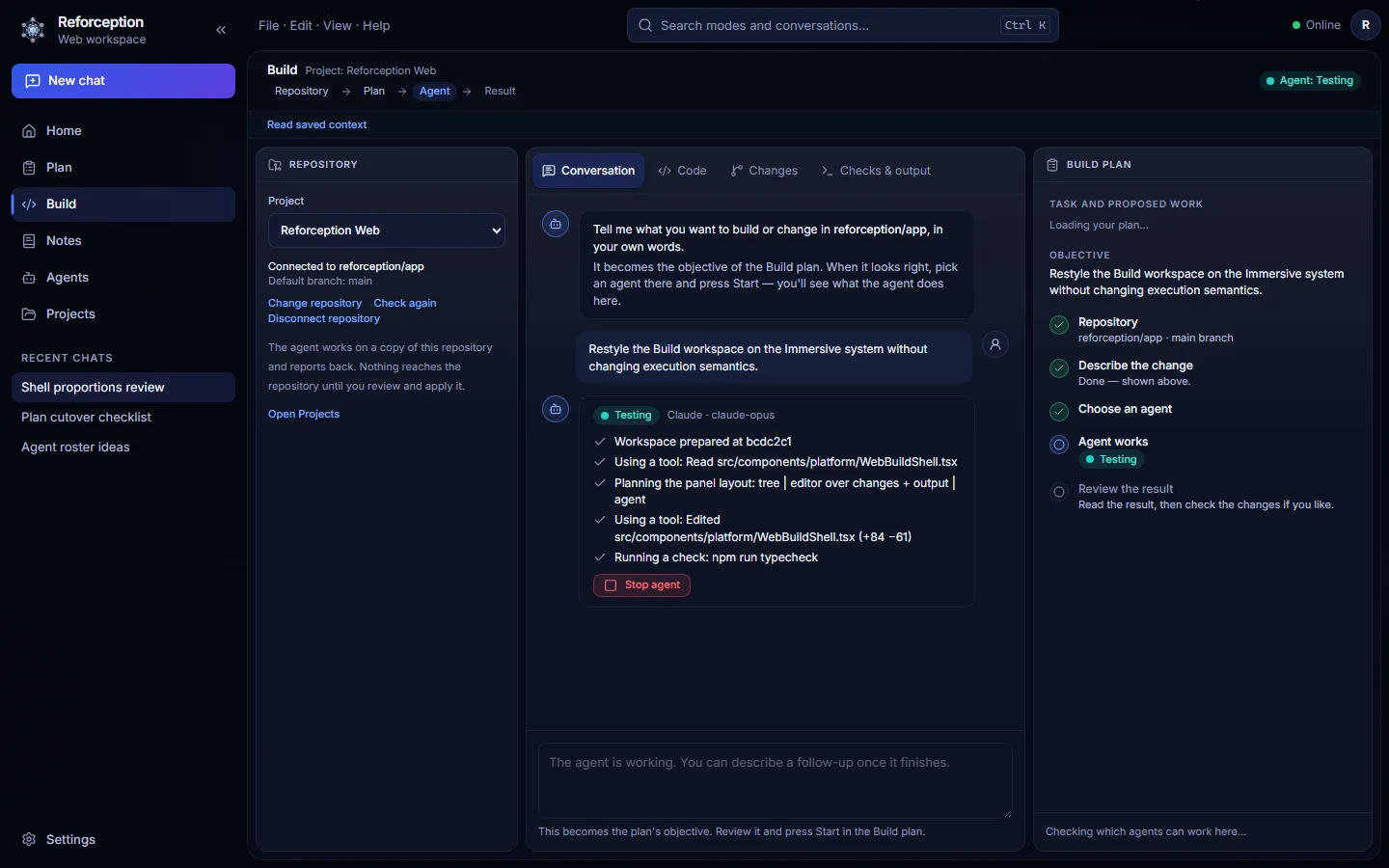
Build is conversation-first. Connect a repository, describe the outcome in ordinary language, choose an eligible worker, then follow the agent activity, changes, and checks without turning the product into an IDE you have to learn first.

  • Repository context stays visible without dominating the experience.
  • Agent progress and Stop remain in the same working conversation.
  • Changes and deterministic checks are available when you need the evidence.
Reforception Build showing repository context, a conversation-first agent session, progress, Stop control, and build plan.
Actual Reforception UI · rendered with fixture data.

Agents

See the workforce, not a mystery process.

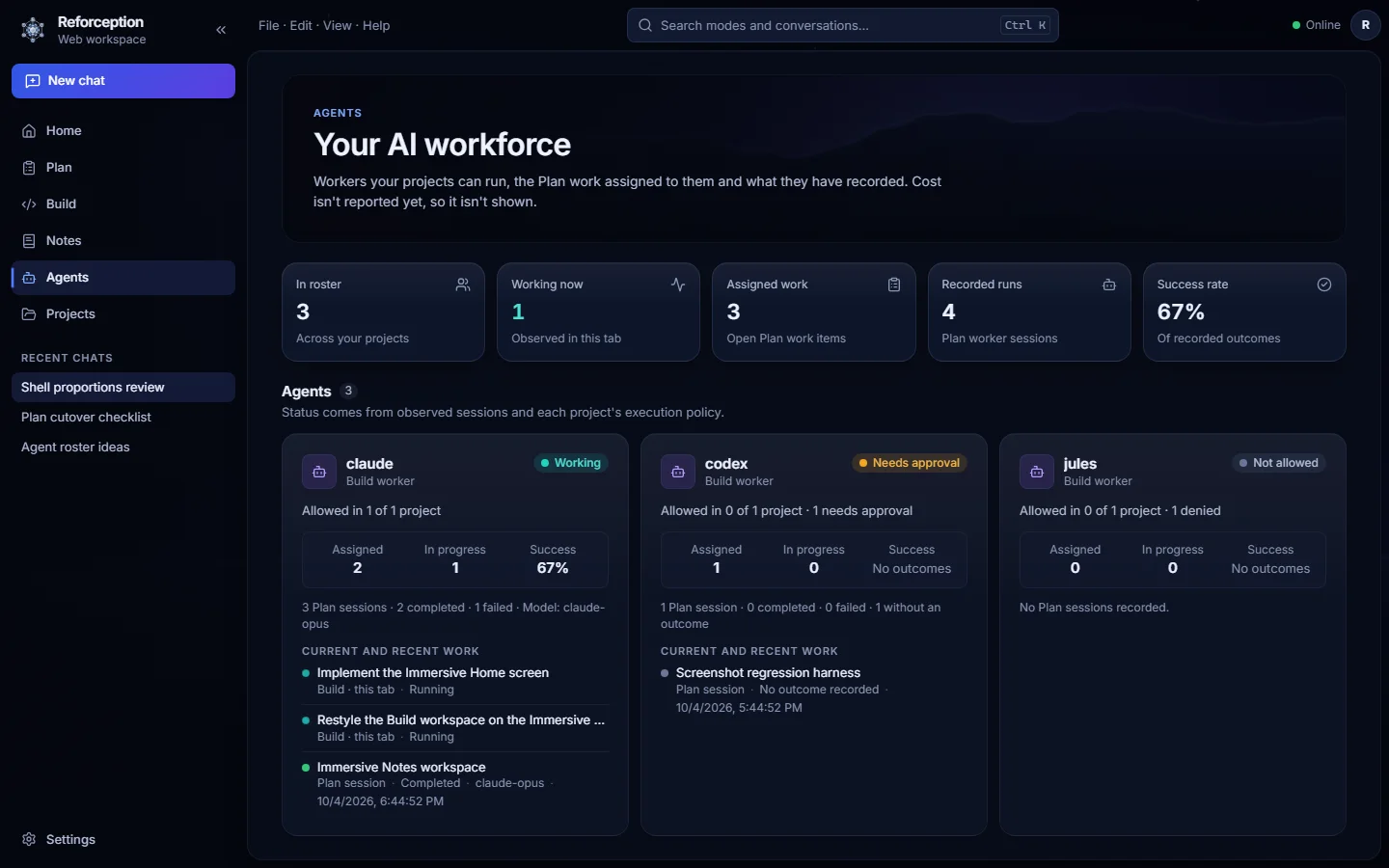
The Agents surface makes workers visible as part of the system. You can see who is working, what is assigned, what has run, and whether a worker is allowed, requires approval, or is not permitted for a project.

  • Current work and recorded runs stay tied to the projects that produced them.
  • Execution policy is visible alongside the worker instead of buried in configuration.
  • Different workers can occupy different roles without pretending they are interchangeable.
Reforception Agents showing an AI workforce with working, approval-required, and not-allowed states.
Actual Reforception UI · rendered with fixture data.

Intelligence

Bring the models you trust. Keep the workspace.

Hosted models and models running closer to your own machines can share one working environment. Select the provider and model for the task in front of you instead of rebuilding the job inside a different app.

If the selected model cannot run, Reforception is designed to stop and tell you rather than quietly continue through a different provider or billing path.

Connected compute

Run work where the work lives.

A desktop, home server, laptop, or remote host can become a bounded execution node through the Host Agent. Reforception keeps the machine, project, and authority visible so using your own compute does not mean granting an agent the rest of the box.

On a machine you control

A Host Agent can run bounded work near the files and resources a job needs, on hardware you already control.

On a remote host you connect

Remote work can run in a separate connected environment with its own permissions, identity, and limits.

Control

Give AI enough authority to work. Not enough to guess.

Reforception is built around visible choices: what is connected, which model is selected, where work runs, and what an agent is actually allowed to do.

  • Connections you add

    Services show up because you connected them. You can see the list.

  • Models you select

    The provider and model for a task are a choice, not a background swap.

  • Permissions on execution

    An agent does not receive a blank check to a machine. Access is scoped to what the job is allowed to do.

  • A visible boundary

    Local execution and remote execution are labeled. Credentials for the application stay server-side, not in this public website.

Example authority

Permissions are part of the job, not a hidden global switch.

A worker can be able to read a repository and work inside an isolated workspace without automatically gaining permission to publish, merge, deploy, or reach the rest of a machine.

Read repository

Inspect the bound project context.

Allowed

Work in isolated workspace

Make bounded changes away from the published source.

Scoped

Run approved checks

Use only the command kinds the workflow grants.

Limited

Publish or deploy

Not implied by repair or Build authority.

Not granted
In development

Triage

Do not trust the first answer just because an AI said it confidently.

Reforception Triage is being built as a review-and-repair pipeline that separates the first scan, independent confirmation, repair authority, and verification. It is not presented here as a finished private-beta feature yet.

  1. 01

    Review

    Quick Scan

    Fast, bounded review for suspicious changes and risk hotspots.

  2. 02

    Confirm

    Deep Scan

    A stronger reviewer independently confirms or rejects important findings.

  3. 03

    Work

    Repair

    An eligible Build worker receives only approved findings and bounded context.

  4. 04

    Prove

    Verify

    Checks and an independent review decide whether the repair is actually clean.

Private beta

Build around your work, not around one model.

Reforception is actively being built. If you already have access, open the application and continue your workspace there.